Friday, October 19, 2007

iTunes U Expands 'Beyond Campus'
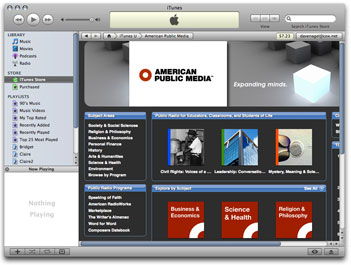

iTunes U, the education portal within Apple's iTunes, has expanded its content to include educational materials from sources beyond colleges and universities, including Smithsonian Global Sound, KQED, Little Kids Rock, and the Museum of Modern Art. The most recent addition to the expanded content area, known as Beyond Campus, is American Public Media, which is making its radio programming available free for educational purposes.

The programming includes selections from APM's programs American RadioWorks, Composer's Datebook, Marketplace, Speaking of Faith, Word for Word, and The Writer's Almanac with Garrison Keillor. The content includes downloadable audio, printable transcripts, and suggestions for discussion points to support classroom use of the programs.

"iTunes U offers an exciting opportunity to extend the value of the outstanding programming produced by American Public Media's radio series, strengthen our relationship with educators, and connect with a generation of students that are already plugged in to iTunes," said Sarah Lutman, senior vice president, Content and Media, American Public Media. "iTunes U will also be a powerful gateway to the dynamic supplemental web content that accompanies our signature programs."


The APM content, as well as other Beyond Programming, is accessible through the iTunes Music Store in the iTunes U section.


Citation
"iTunes U Expands 'Beyond Campus'," Campus Technology, 10/19/2007, http://www.campustechnology.com/article.aspx?aid=52161

Friday, September 21, 2007

Wikipedia: Use It Or Not

Wikipedia is a free online encyclopedia which anyone can add or edit its content. Due to its open nature, Wikipedia is now the largest, most extensive and fastest growing encyclopedia currently available online. However, it is also criticized about its reliability and accuracy. To know more about Wikipedia and its implications for teaching and learning, please check “7 Things you Should know about Wikipedia” from Educause.

You may already find that your students are using Wikipedia as references in their papers more and more. To instruct your students about the information they find on Wikipedia and how to use those information, please check Wikipedia’s own article about researching with Wikipedia.

Wednesday, August 15, 2007

The Facebook Craze

Facebook is the new social networking website for college and high school students. In July 2007 the website had 34 million registered users, the largest number of recorded users among the college focused websites. With features such as The Wall , Gifts , Marketplace , Pokes , Status , Applications , Facebook Markup Language students are using the site to keep in touch with friends and family, share pictures, links, videos,and make new friends.

Here are 7 Things You Should Know About Facebook
http://www.educause.edu/ir/library/pdf/ELI7017.pdf

Feel free to add your comments.
If you are an instructor or student we would like to know your overall impression of Facebook. What are the advantages and disadvantages of such a site in Academia?

Friday, June 8, 2007

Educational Origami

Development in technology brings instructors many exciting and promising opportunities. However, how to integrate those new tools into little changed traditional classroom education or newly arising online education is one of the most challenging issues that teachers face. Education Origami—a Wiki created by Andrew Churches, a New Zealand middle school teacher—is dedicated to help instructors migrate from traditional classroom to technology-enhanced instruction.

One of the resource that I find particular useful for a teacher starting to utilize technology in teaching is Bloom's Taxonomy and Digital Approaches. In this article, the author create a connection between the Bloom's Taxonomy Element-a familiar concept to many teachers-and digital approaches and tools.

You may also find inspired by Traditional Practice and Digital Approaches, which looks at "traditional classroom practice and potential digital alternatives." The table is especially useful when you'd like to convert a traditional classroom activity into an online practice.

The Wiki site also has a lot of information regarding how to utilize digital tools according the student's learning style, e.g., visual learner, auditory learner, reader/write learner, and kinesthetic learner.

Friday, May 25, 2007

Help Digitize Old Text - ReCaptcha

ReCaptcha is a program developed by a group of Carnegie Mellon University programmers. This program/service can help cut down on spam while letting people digitize books. Every time you decode a word it is captured and stored. "Not only can you solve your problems with spam, you can help preserve mankind's written history into the digital age," said Ben Maurer, the project's chief architect and a Carnegie Mellon University. Full story >>

Monday, May 21, 2007

Online Community For Sharing Ideas.


About Maricopa Learning eXchange.
The Maricopa Learning eXchange (MLX) is an electronic collection of learning objects, ideas, examples and resources that support teaching and learning.

How it works.
Each content module is package and is represented by a descriptive "packing slip" consisting of the author’s name, college(s) that were involved in developing it, contact information, a description, links to web sites associated with the package. The attachments provided are free for educational use as long as credit is given to the package owner (MLX Website, 2007).

To Visit Website: http://www.mcli.dist.maricopa.edu/mlx/index.php

Friday, May 11, 2007

Back When Books Emerged As a New Technology

I encountered this video - Introducing the Book - on YouTube, which shows how help desk in medieval would do to introduce the new “technology” – BOOK! It’s a hilarious one. At the same time, however, it vividly demonstrates how people deal with new technology with their old mindsets. It could happen to anyone.


This makes me think after the laughter. On one hand, being technology-proficient, we may sometime neglect the fears and difficulties other people often have when facing new technologies. The key is how to clarify those fears and difficulties a user may have beforehand and then try to clear them along the way.

On the other hand, this video might be a good tool to start a workshop about technology. Although it is less threatening than the dazzling “Machine is Us/ing Us” video we introduced before, it will put the audience at ease since being nervous and confused about new technology is quite normal and would’ve never been an obstacle to learning.